
OVERVIEW
Making hands-on, biology lab experiment more affordable and accessible
Hands-on, lab-based science experiments are critical in STEM education but are often expensive and inaccessible, particularly for students with learning disabilities (LDs).
Motion Lab aims to create an interactive virtual simulation of a biology lab experiment that is relatively cheaper, with a focus on an accessible experience for students with LDs.
Our final product is a Unity application that users can interact with through the Leap Motion sensor, covering the main concepts of the micropipette experiment.
demo video
BACKGROUND
In need of a virtual solution to reach more students
Our client, PittBio Outreach, has developed Pitt-Kits, which include essential equipment and video instructions to help K-12 students perform lab experiments. However, due to the limited availability of these kits and safety concerns associated with certain experiments, PittBio is seeking to expand their reach by offering virtual learning solutions.


Simultaneously, the Learning Disabilities Association of Pennsylvania (LDA of PA) recognizes the unique challenges students with LDs face in traditional laboratory settings. They see this initiative as an opportunity to enhance educational access for these students through highlighting the accessibility of the new virtual learning solution.

THE GOAL
Building a prove of concept for scalable system
Starting with Micropipette: essential, expensive, and challenging to learn digitally.
Why start with micropipette?

SUCCESS METRIC
Measuring success through:
Accessibility
Affordability
Gesture transferability.
Better understand what students need through research
Traditional lab-based experiments can feel overwhelming due to fragmented instructions, constant attention-switching, and inaccessible teaching methods.
Academic Research
Effective learning methods for students with learning disabilities.
Expert Interview
The problem with traditional learning method for lab experiment.
Contextual Inquiry
First-hand observation of student's experience with lab experiments.


Different students find different modes of instruction useful, and the preferred mode may be dependent on experience

???
Following the experiment video required students to switch attention back and forth between multiple areas during steps.

Most errors occurred from forgetting steps or improper use of the equipment.

Immediate feedback is crucial to error reduction and learning.
Based on these research insights, we proposed the following features to make the virtual lab experience more accessible:
Multimodal instructions: Offer multimodal instruction combining video, text, and narration to accommodate varying learning preferences.
Streamlined Interactions: Minimize task-switching by integrating instructions and immediate feedback directly into the workflow to guide user focus.
Open and Observable Environment: Create a shared, open environment where peers can observe each other’s progress, enabling body doubling while maintaining an immersive and realistic practice experience.
From expensive to affordable
Choosing the appropriate medium and technology
After an exploration of different technologies that enable replicating the pipetting motion interaction, we chose Leap Motion for its flexibility to capture a wide range of lab experiment gestures.


From passive watching to hands-on practice
Effectively transfer conceptual learning from digital to real micropipette.
Small, precise movements based on tactile feedback
Operating a real micropipette relies on small, precise thumb movements, with tactile feedback distinguishing the first and second stops.


We used Wizard of Oz techniques to communicates the effects of hand gestures our participants would make with a figma prototype.

However, in a digital environment, the absence of physical feedback presents a challenge. The only observable differentiator becomes the distance the plunger moves, which is subtle and easily overlooked if the interaction mirrors real-world gestures, which would cause users to get confused about the difference between the two different stops.
How did early user testing revealed this issue?
Our Approach
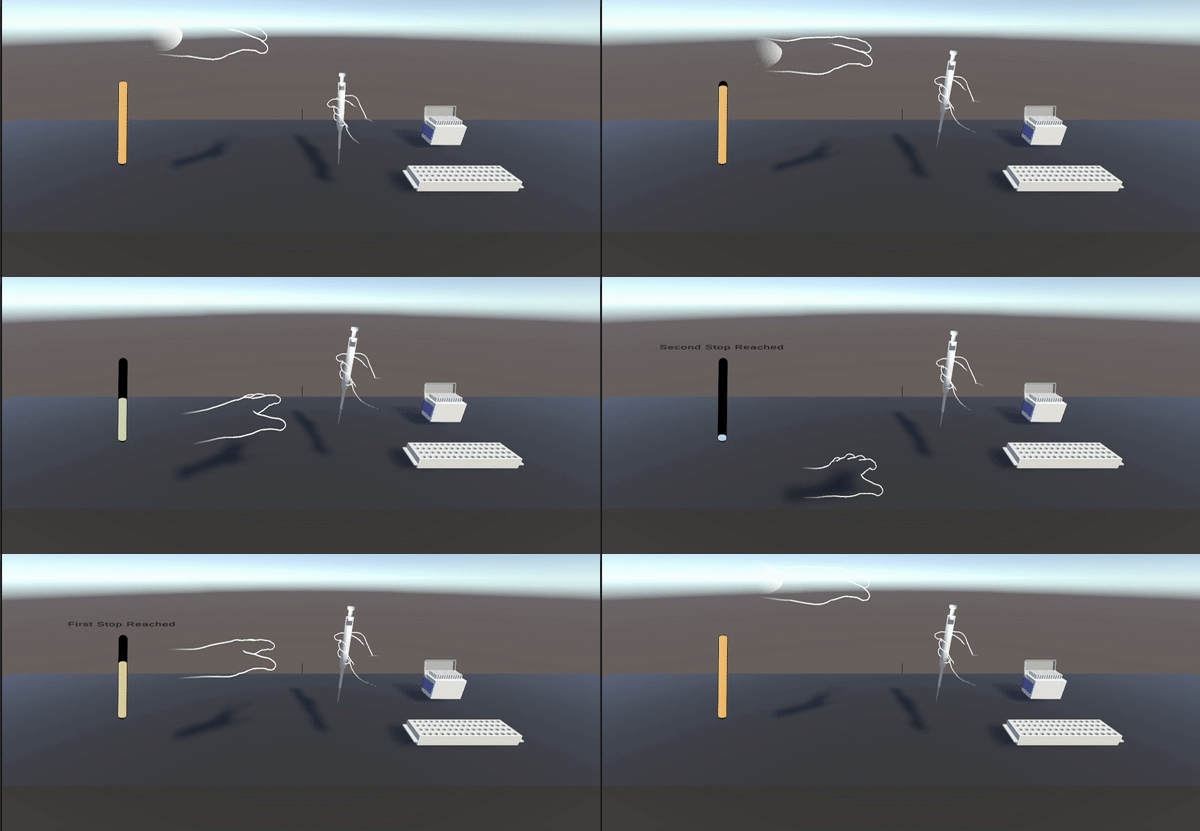
We decided to prioritize the conceptual understanding of what first stop and second stop does rather than replicating the exact gesture of operating micropipette. Exaggerating the motions needed to reach the first and second stops helps with understanding. Below is an exploration of potential gestures to use:
Key Motion 1: Pressing


Key Motion 2: Turning


Virtual learning system gives visual and auditory feedback cues to signal when the user has reached the first stop. This approach encourages users to internalize the tactile equivalents, building a conceptual understanding through interaction.

“There’s a little bit of hesitation before you reach the first stop [but] I wouldn’t say I feel [the pressure] at this point..."
Through Mid-fidelity user testing, we verified that bigger motion combined with audio-visual feedback are effective, but should be further exaggerated for beginner users.
Simulated physical feedback with exaggerated audio/visual feedback:
To replicate the tactile experience of a physical micropipette, we integrated a physics-based UI that simulates the behavior of a spring-loaded plunger. Just as in the real tool, the initial press is smooth and requires less effort, while pressing further increases resistance, mimicking the harder-to-press sensation of the second stop.


First Stop
Second Stop
Released
“Easy to press down”
“Harder to press down”
Result
“This is exactly what we’re looking for!"


price
immersion
accessibility
concept learning
engagement
hands-on practice
Labster
price
immersion
accessibility
concept learning
engagement
hands-on practice
Gizmos


